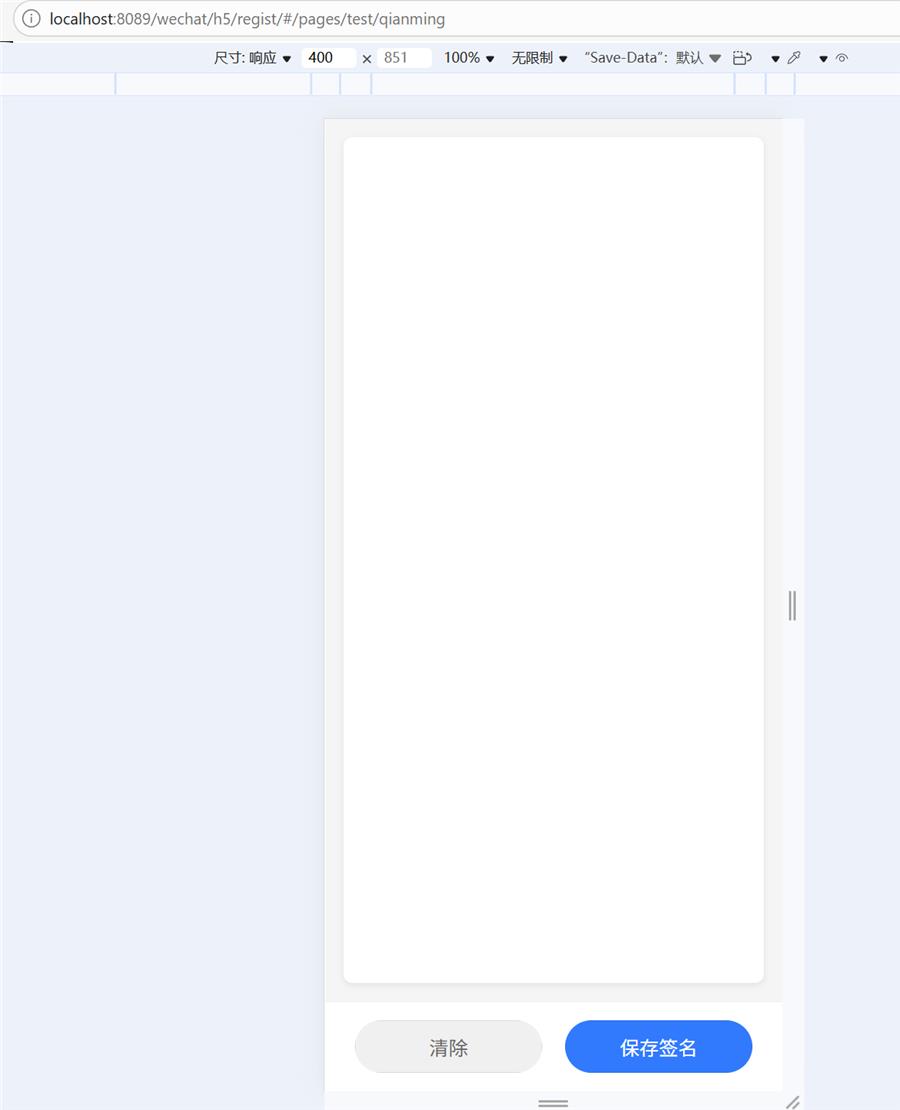
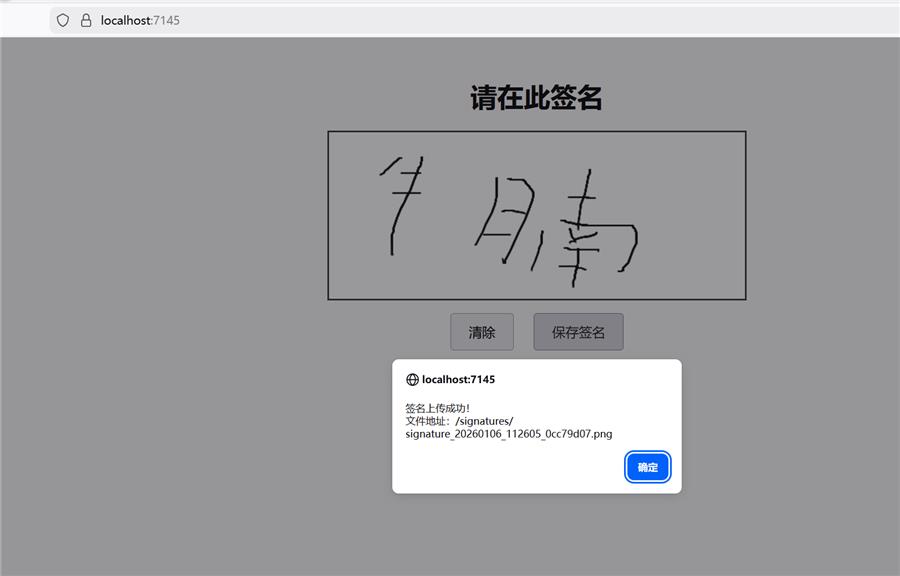
前端HTML代码:
@{
    Layout = null;
}

<!DOCTYPE html>
<html lang="zh-CN">
<head>
    <meta charset="UTF-8" />
    <meta name="viewport" content="width=device-width, initial-scale=1.0" />
    <title>用户签名</title>
    <style>
        body {
            font-family: Arial, sans-serif;
            display: flex;
            flex-direction: column;
            align-items: center;
            padding: 20px;
            background-color: #f9f9f9;
        }

        h1 {
            margin-bottom: 20px;
        }

        #signatureCanvas {
            border: 2px solid #333;
            background-color: white;
            cursor: crosshair;
            touch-action: none; /* 禁用触摸滚动/缩放 */
        }

        .controls {
            margin-top: 15px;
        }

        button {
            padding: 10px 20px;
            margin: 0 10px;
            font-size: 16px;
            cursor: pointer;
        }

            button:hover {
                opacity: 0.9;
            }
    </style>
    <script src="~/lib/jquery/dist/jquery.min.js"></script>
</head>
<body>

    <h1>请在此签名</h1>
    <canvas id="signatureCanvas" width="500" height="200"></canvas>

    <div class="controls">
        <button id="clearBtn">清除</button>
        <button id="saveBtn">保存签名</button>
    </div>
    <div id="res"></div>
    <script>
  const canvas = document.getElementById('signatureCanvas');
  const ctx = canvas.getContext('2d');
  let isDrawing = false;

  // 设置画笔样式
  ctx.lineWidth = 2;
  ctx.lineCap = 'round';
  ctx.strokeStyle = '#000';

  // 鼠标事件
  canvas.addEventListener('mousedown', startDrawing);
  canvas.addEventListener('mousemove', draw);
  canvas.addEventListener('mouseup', stopDrawing);
  canvas.addEventListener('mouseout', stopDrawing);

  // 触摸事件(移动端)
  canvas.addEventListener('touchstart', handleTouchStart);
  canvas.addEventListener('touchmove', handleTouchMove);
  canvas.addEventListener('touchend', handleTouchEnd);

  function getMousePos(e) {
    const rect = canvas.getBoundingClientRect();
    return {
      x: e.clientX - rect.left,
      y: e.clientY - rect.top
    };
  }

  function getTouchPos(touch) {
    const rect = canvas.getBoundingClientRect();
    return {
      x: touch.clientX - rect.left,
      y: touch.clientY - rect.top
    };
  }

  function startDrawing(e) {
    isDrawing = true;
    const pos = getMousePos(e);
    ctx.beginPath();
    ctx.moveTo(pos.x, pos.y);
  }

  function draw(e) {
    if (!isDrawing) return;
    const pos = getMousePos(e);
    ctx.lineTo(pos.x, pos.y);
    ctx.stroke();
  }

  function stopDrawing() {
    isDrawing = false;
  }

  // 触摸事件处理
  function handleTouchStart(e) {
    e.preventDefault();
    const touch = e.touches[0];
    const pos = getTouchPos(touch);
    isDrawing = true;
    ctx.beginPath();
    ctx.moveTo(pos.x, pos.y);
  }

  function handleTouchMove(e) {
    e.preventDefault();
    if (!isDrawing) return;
    const touch = e.touches[0];
    const pos = getTouchPos(touch);
    ctx.lineTo(pos.x, pos.y);
    ctx.stroke();
  }

  function handleTouchEnd(e) {
    e.preventDefault();
    isDrawing = false;
  }

  // 清除画布
  document.getElementById('clearBtn').addEventListener('click', () => {
    ctx.clearRect(0, 0, canvas.width, canvas.height);
  });

  // 保存签名
        document.getElementById('saveBtn').addEventListener('click', () => {
            const dataURL = canvas.toDataURL('image/png'); // 获取 base64 字符串

            // 显示图片预览(可选)
            // const img = new Image();
            // img.src = dataURL;
            // document.body.appendChild(img);

            // 发送 AJAX 到后端
            $.ajax({
                url: '/home/index', // 根据实际情况调整 URL 路径
                type: 'POST',
                contentType: 'application/json;charset=UTF-8',
                data: JSON.stringify({
                    Signature: dataURL // 传递给后端的数据
                }),
                success: function (response) {
                    if (response.success) {
                        alert("签名上传成功!\n文件地址:" + response.url);
                        // 可以在此处处理返回的文件URL,比如显示在页面上等
                        $('#res').html("<a href='"+response.url+"'>"+response.url+"</a>")
                    } else {
                        alert("签名上传失败!");
                    }
                },
                error: function (xhr, status, error) {
                    console.error('签名上传时发生错误:', error);
                    alert("签名上传时发生错误,请重试!");
                }
            });
  });
    </script>

</body>
</html>
后端C#代码:
using Microsoft.AspNetCore.Mvc;
using System.Diagnostics;
using System.Text.RegularExpressions;
using userqianming.Models;

namespace userqianming.Controllers
{
    public class HomeController : Controller
    {

        public IActionResult Index()
        {
            return View();
        }

        [HttpPost]
        public async Task<IActionResult> Index([FromBody] SignatureRequest request)
        {
            if (string.IsNullOrEmpty(request?.Signature))
            {
                return BadRequest("签名数据为空");
            }

            try
            {
                // 提取 base64 部分(去掉 data URL 前缀)
                var base64Data = request.Signature;
                if (base64Data.StartsWith("data:image"))
                {
                    // 使用正则或 Split 移除前缀
                    var match = Regex.Match(base64Data, @"^data:image\/\w+;base64,(.*)$");
                    if (match.Success)
                    {
                        base64Data = match.Groups[1].Value;
                    }
                    else
                    {
                        return BadRequest("无效的 Base64 图片格式");
                    }
                }

                // 解码 Base64
                byte[] imageBytes = Convert.FromBase64String(base64Data);

                // 设置保存路径(例如:wwwroot/signatures/)
                var folderPath = Path.Combine(Directory.GetCurrentDirectory(), "wwwroot", "signatures");
                Directory.CreateDirectory(folderPath); // 确保目录存在

                // 生成唯一文件名
                string fileName = $"signature_{DateTime.Now:yyyyMMdd_HHmmss}_{Guid.NewGuid().ToString("N")[..8]}.png";
                string filePath = Path.Combine(folderPath, fileName);

                // 保存文件
                await System.IO.File.WriteAllBytesAsync(filePath, imageBytes);

                // 可选:返回保存的 URL 或成功信息
                var fileUrl = $"/signatures/{fileName}";
                return Ok(new { success = true, url = fileUrl });
            }
            catch (Exception ex)
            {
                // 记录日志(可集成 ILogger)
                Console.WriteLine($"保存签名失败: {ex.Message}");
                return StatusCode(500, "保存签名时发生错误");
            }
        }


    }

    // DTO 用于接收 JSON 数据
    public class SignatureRequest
    {
        public string? Signature { get; set; }
    }
}
2026年3月21日新增的uni app代码,C#后端返回接口改code和data:fileurl
下面是一个完整的 UniApp 手写签名页面示例,使用 Canvas 2D 实现,包含手写、清除、保存功能:```html
<template>
<view class="container">
<!-- <view class="header">
<text class="title">手写签名</text>
</view> -->
<view class="canvas-box">
<canvas type="2d" id="signatureCanvas" canvas-id="signatureCanvas" class="signature-canvas"
@touchstart="touchStart" @touchmove.stop="touchMove" @touchend="touchEnd"></canvas>
</view>
<view class="footer">
<button class="btn clear-btn" @click="clearSignature">清除</button>
<button class="btn save-btn" @click="saveSignature">保存签名</button>
</view>
</view>
</template>
<script>
export default {
data() {
return {
canvas: null,
ctx: null,
isDrawing: false,
lastX: 0,
lastY: 0,
dpr: 1
}
},
onReady() {
this.initCanvas()
},
methods: {
// 初始化 Canvas
async initCanvas() {
const query = uni.createSelectorQuery().in(this)
query.select('#signatureCanvas')
.fields({
node: true,
size: true
})
.exec((res) => {
if (!res[0]) return
this.canvas = res[0].node
this.ctx = this.canvas.getContext('2d')
// 处理高清屏
this.dpr = uni.getSystemInfoSync().pixelRatio
this.canvas.width = res[0].width * this.dpr
this.canvas.height = res[0].height * this.dpr
this.ctx.scale(this.dpr, this.dpr)
// 设置画笔样式
this.setPenStyle()
})
},
// 设置画笔样式
setPenStyle() {
this.ctx.lineWidth = 3 // 线条宽度
this.ctx.strokeStyle = '#000000' // 线条颜色
this.ctx.lineCap = 'round' // 线条端点样式
this.ctx.lineJoin = 'round' // 线条连接样式
},
// 触摸开始
touchStart(e) {
e.preventDefault()
e.stopPropagation()
this.isDrawing = true
const touch = e.touches[0]
const point = this.getPoint(touch)
this.lastX = point.x
this.lastY = point.y
this.ctx.beginPath()
this.ctx.moveTo(this.lastX, this.lastY)
},
// 触摸移动
touchMove(e) {
e.preventDefault()
e.stopPropagation()
if (!this.isDrawing) return
const touch = e.touches[0]
const point = this.getPoint(touch)
this.ctx.lineTo(point.x, point.y)
this.ctx.stroke()
this.lastX = point.x
this.lastY = point.y
},
// 触摸结束
touchEnd(e) {
e.preventDefault()
e.stopPropagation()
this.isDrawing = false
},
// 获取 Canvas 相对坐标
getPoint(touch) {
const query = uni.createSelectorQuery().in(this)
query.select('#signatureCanvas').boundingClientRect((rect) => {
if (!rect) return
this.canvasRect = rect
}).exec();
var xxx = {
x: touch.x,
y: touch.y
};
return xxx;
},
// 清除签名
clearSignature() {
if (!this.ctx || !this.canvas) return
this.ctx.clearRect(0, 0, this.canvas.width / this.dpr, this.canvas.height / this.dpr)
},
// 保存签名
async saveSignature() {
if (!this.canvas) return
uni.showLoading({
title: "保存中..."
})
uni.canvasToTempFilePath({
canvasId: "signatureCanvas",
fileType: 'png',
quality: 1,
success: (res) => {
var base64str = res.tempFilePath;
//-----调用自己写的后端代码----
// var url = getApp().globalData.niunanUrl + "/userqm/index";
// uni.request({
// url: url,
// method: "POST",
// data: {
// Signature: base64str
// },
// header: {
// 'content-type': 'application/json' //自定义请求头信息
// },
// success: (res2) => {
// uni.hideLoading()
// var jsonobj = res2.data;
// if (jsonobj.code == 1) {
// var imgurl = jsonobj.data.fileurl;
// let pages = getCurrentPages(),
// prevPage = pages[pages.length - 2]
// // 运行上个页面的函数并传值
// prevPage.$vm.set_qmimg(imgurl)
// prevPage.$vm.$nextTick(() => {
// uni.navigateBack({
// delta: 1
// })
// })
// } else {
// uni.showModal({
// content: jsonobj.msg,
// showCancel: false,
// })
// }
// }
// });
//-----调用自己写的后端代码 end ----
//-----调用程工写的后端代码,要传入图片临时路径-----
var url = getApp().globalData.baseUrl + '/vdnapi/common/upfile'
uni.uploadFile({
timeout: 10000, //超时10秒
url: url,
filePath: res.tempFilePath,
name: 'file1',
formData: {
filetype: 'qianming'
},
success: (res2) => {
uni.hideLoading()
var jsonobj = JSON.parse(res2.data);
if (jsonobj.code == 1) {
var imgurl = jsonobj.data.fileurl;
let pages = getCurrentPages(),
prevPage = pages[pages.length - 2]
// 运行上个页面的函数并传值
prevPage.$vm.set_qmimg(imgurl)
prevPage.$vm.$nextTick(() => {
uni.navigateBack({
delta: 1
})
})
} else {
uni.showModal({
content: jsonobj.msg,
showCancel: false,
})
}
},
fail: (res3) => {
uni.showModal({
content: '上传出错:' + JSON.stringify(res3),
showCancel: false,
})
}
});
//-----调用程工写的后端代码,要传入图片临时路径 end-----
},
fail: (err) => {
console.log(err)
uni.showToast({
title: '生成图片失败',
icon: 'error'
})
}
})
},
/**
* base64转临时文件路径(兼容App端和H5端)
* @param {String} base64 - base64图片字符串
* @returns {Promise<String>} 临时文件路径
*/
base64ToTempFilePath(base64) {
return new Promise((resolve, reject) => {
// 去除base64头部信息
const base64Data = base64.replace(/^data:image\/\w+;base64,/, '');
// #ifdef APP-PLUS
// App端处理:使用plus.io将base64写入临时文件
const fileName = `upload_${Date.now()}_${Math.random().toString(36).substr(2, 9)}.png`;
plus.io.requestFileSystem(plus.io.PRIVATE_DOC, (fs) => {
fs.root.getFile(fileName, {
create: true
}, (fileEntry) => {
fileEntry.createWriter((writer) => {
writer.onwriteend = () => {
// 转换为uni.uploadFile可识别的路径
const localFilePath = plus.io
.convertLocalFileSystemURL(fileEntry.fullPath);
resolve(localFilePath);
};
writer.onerror = (error) => {
reject(new Error('写入文件失败: ' + error.message));
};
// 将base64转换为ArrayBuffer,再转为二进制字符串
const arrayBuffer = uni.base64ToArrayBuffer(base64Data);
const binaryString = String.fromCharCode.apply(null,
new Uint8Array(arrayBuffer));
writer.writeBinary(binaryString);
}, reject);
}, reject);
}, reject);
// #endif
// #ifdef H5
// H5端处理:创建Blob URL
try {
const arrayBuffer = uni.base64ToArrayBuffer(base64Data);
const blob = new Blob([arrayBuffer], {
type: 'image/png'
});
const blobUrl = URL.createObjectURL(blob);
resolve(blobUrl);
} catch (error) {
reject(error);
}
// #endif
// #ifdef MP-WEIXIN
// 微信小程序端处理
const fs = wx.getFileSystemManager();
const filePath = `${wx.env.USER_DATA_PATH}/${Date.now()}.png`;
try {
fs.writeFileSync(filePath, base64Data, 'base64');
resolve(filePath);
} catch (error) {
reject(error);
}
// #endif
});
},
}
}
</script>
<style lang="scss" scoped>
/* 关键:阻止整个页面滚动 */
page {
overflow: hidden;
height: 100%;
width: 100%;
}
.container {
display: flex;
flex-direction: column;
height: 100vh;
background-color: #f5f5f5;
overflow: hidden;
touch-action: none;
/* 关键 CSS 属性:禁止浏览器处理该区域的触摸动作 */
}
.header {
padding: 30rpx;
background-color: #fff;
text-align: center;
border-bottom: 1rpx solid #eee;
.title {
font-size: 36rpx;
font-weight: bold;
color: #333;
}
}
.canvas-box {
flex: 1;
padding: 30rpx;
.signature-canvas {
width: 100%;
height: 100%;
background-color: #fff;
border-radius: 16rpx;
box-shadow: 0 4rpx 12rpx rgba(0, 0, 0, 0.08);
}
}
.footer {
display: flex;
justify-content: space-between;
padding: 30rpx;
background-color: #fff;
border-top: 1rpx solid #eee;
.btn {
flex: 1;
margin: 0 20rpx;
height: 88rpx;
line-height: 88rpx;
border-radius: 44rpx;
font-size: 32rpx;
border: none;
}
.clear-btn {
background-color: #f0f0f0;
color: #666;
}
.save-btn {
background-color: #007aff;
color: #fff;
}
}
</style>